

Introduction
In today’s fast-paced digital world, user experience (UX) is everything. While we often focus on making our applications faster, sometimes loading is inevitable. That’s where loaders come in—they transform the frustrating experience of waiting into an engaging moment. Well-designed loaders can maintain user engagement, manage expectations, and even enhance brand perception.
Loaders are more than just visual placeholders; they’re communication tools that tell users: “We’re working on your request,” “Please wait,” or “Something is happening.” In this comprehensive guide, we’ll explore five professional loader designs you can implement in your projects, complete with HTML, CSS, and JavaScript.
Why Loaders Matter: The Psychology Behind the Wait
Before we dive into the technical implementation, let’s understand why loaders are crucial:
- Manage User Expectations: A loader tells users that the system is working, reducing anxiety about whether their action was registered.
- Improve Perceived Performance: Studies show that users perceive faster loading times when they see progress indicators.
- Prevent User Abandonment: Engaging animations can keep users from leaving your site during loading periods.
- Enhance Brand Image: Professional, well-designed loaders reflect positively on your brand’s attention to detail.
The 5 Professional Loader Designs
1. Quantum Orbital Loader
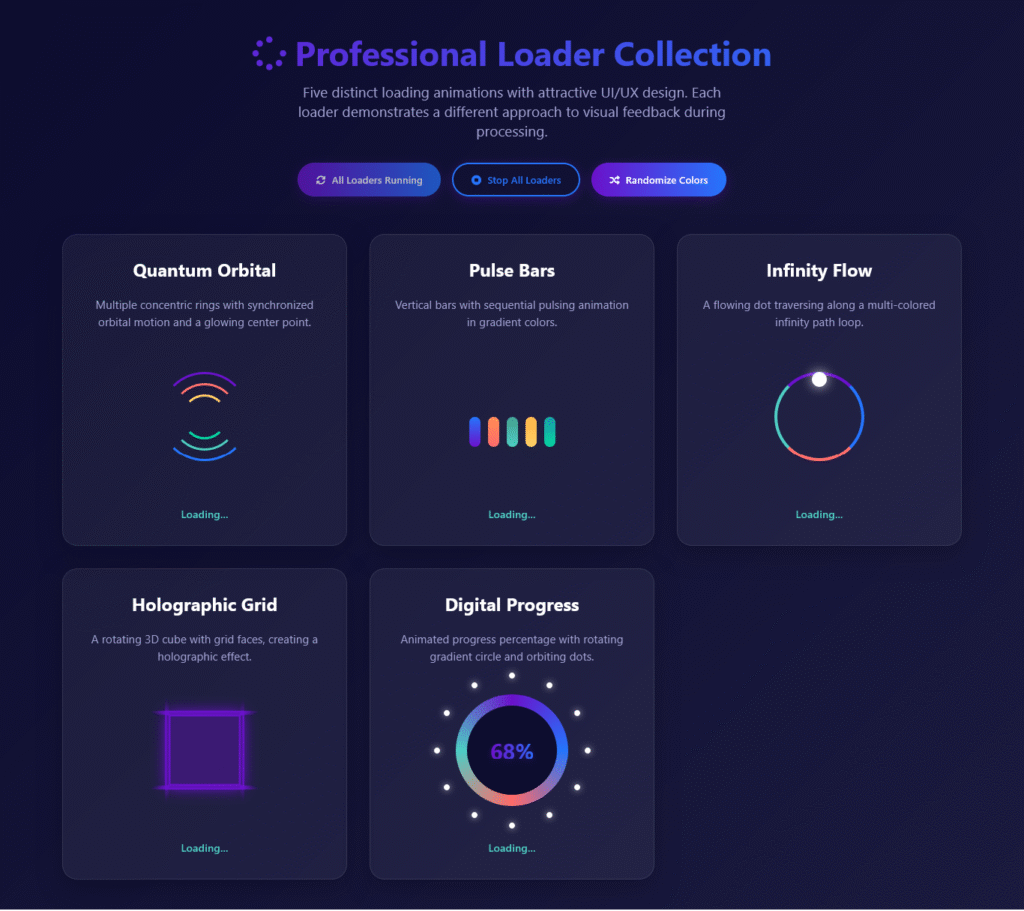
Concept: Multiple concentric rings with synchronized orbital motion and a glowing center point.
Best For: Scientific applications, data visualization tools, or any application dealing with complex processes.
Implementation Insight:
This loader creates depth through three rotating rings moving at different speeds and directions. The key to its appeal is the smooth synchronization and the glowing center point that draws attention.
2. Pulse Bars Loader
Concept: Vertical bars with sequential pulsing animation in gradient colors.
Best For: Music players, audio applications, or any rhythmic, sequential processes.
Implementation Insight:
The staggered animation creates a wave-like effect that’s both mesmerizing and informative. Each bar pulses with a slight delay, creating a sense of progression.
3. Infinity Flow Loader
Concept: A flowing dot traversing along a multi-colored infinity path loop.
Best For: Creative applications, design tools, or any app emphasizing continuous processes.
Implementation Insight:
The infinity symbol (∞) represents endless possibilities, making this loader perfect for ongoing processes. The dot follows a complex path animation while the colored border rotates.
4. Holographic Grid Loader
Concept: A rotating 3D cube with grid faces, creating a holographic effect.
Best For: 3D modeling applications, VR/AR experiences, or futuristic interfaces.
Implementation Insight:
This loader uses CSS 3D transforms to create a cube that rotates on multiple axes. The grid pattern adds depth while maintaining transparency.
5. Digital Progress Loader
Concept: Animated progress percentage with rotating gradient circle and orbiting dots.
Best For: File uploaders, installation processes, or any task with measurable progress.
Implementation Insight:
This is the most informative loader, providing exact percentage feedback. The orbiting dots add visual interest while the gradient circle creates a sense of motion.
Key Principles of Effective Loader Design
1. Keep It Simple but Meaningful
The best loaders are simple enough not to distract but meaningful enough to convey progress. Avoid overly complex animations that might slow down the page further.
2. Match Your Brand Aesthetics
Your loader should feel like part of your application, not an afterthought. Use brand colors, shapes, and design language.
3. Provide Context When Possible
Whenever you can, tell users what’s happening. “Loading your profile” is better than just showing a spinner.
4. Consider Loading Time
For very short loads (under 300ms), consider not showing a loader at all to avoid flash. For longer loads, show progress indicators.
5. Make It Accessible
Ensure your loaders work for all users:
- Include proper ARIA labels for screen readers
- Avoid animations that could trigger vestibular disorders
- Provide a way to pause or stop animations
Performance Considerations
While loaders enhance UX, they shouldn’t degrade performance:
- Optimize Animations: Use CSS transforms and opacity changes instead of properties that trigger layout reflows.
- Reduce Complexity: Complex SVG animations might be beautiful but can impact performance on low-end devices.
- Lazy Load: Load your loader animations only when needed.
- Use Hardware Acceleration: For smooth animations, use
transform: translateZ(0)orwill-changeproperty.
For mobile devices, consider:
- Larger touch targets for interactive loaders
- Reduced animation complexity for battery conservation
- Testing on actual mobile devices for performance
Advanced Techniques
1. Skeleton Screens
Consider using skeleton screens (placeholder content) for content-heavy pages. These give users a preview of what’s coming while content loads.
2. Predictive Loading
Use AI or user behavior analysis to predict what users will do next and pre-load accordingly, reducing the need for loaders.
3. Smart Progress Indicators
For unpredictable loading times, use “determinate” loaders when you know the total time and “indeterminate” when you don’t.
4. Emotional Design
Some apps use playful, brand-specific loaders that entertain users during wait times. For example, Slack’s loading messages are famously witty.
Implementation Tips
<!DOCTYPE html>
<html lang="en">
<head>
<meta charset="UTF-8" />
<meta name="viewport" content="width=device-width, initial-scale=1.0" />
<title>Professional Loader Collection</title>
<link
rel="stylesheet"
href="https://cdnjs.cloudflare.com/ajax/libs/font-awesome/6.4.0/css/all.min.css"
/>
<style>
* {
margin: 0;
padding: 0;
box-sizing: border-box;
font-family: "Segoe UI", Tahoma, Geneva, Verdana, sans-serif;
}
body {
background: linear-gradient(135deg, #0c0c2e 0%, #1a1a3e 100%);
color: #fff;
min-height: 100vh;
padding: 40px 20px;
}
.container {
max-width: 1200px;
margin: 0 auto;
}
header {
text-align: center;
margin-bottom: 50px;
}
h1 {
font-size: 2.8rem;
margin-bottom: 10px;
background: linear-gradient(to right, #6a11cb 0%, #2575fc 100%);
-webkit-background-clip: text;
background-clip: text;
color: transparent;
}
.subtitle {
font-size: 1.2rem;
color: #a0a0d0;
max-width: 600px;
margin: 0 auto 30px;
}
.controls {
display: flex;
justify-content: center;
gap: 15px;
margin-top: 20px;
flex-wrap: wrap;
}
.btn {
padding: 12px 24px;
background: linear-gradient(to right, #6a11cb, #2575fc);
color: white;
border: none;
border-radius: 30px;
font-weight: 600;
cursor: pointer;
transition: all 0.3s ease;
display: flex;
align-items: center;
gap: 8px;
box-shadow: 0 4px 15px rgba(106, 17, 203, 0.3);
}
.btn:hover {
transform: translateY(-3px);
box-shadow: 0 6px 20px rgba(106, 17, 203, 0.4);
}
.btn:active {
transform: translateY(1px);
}
.btn-outline {
background: transparent;
border: 2px solid #2575fc;
color: #2575fc;
}
.loaders-grid {
display: grid;
grid-template-columns: repeat(auto-fill, minmax(350px, 1fr));
gap: 30px;
margin-top: 40px;
}
.loader-card {
background: rgba(255, 255, 255, 0.05);
border-radius: 20px;
padding: 30px;
box-shadow: 0 10px 30px rgba(0, 0, 0, 0.2);
backdrop-filter: blur(10px);
border: 1px solid rgba(255, 255, 255, 0.1);
transition: transform 0.3s ease, box-shadow 0.3s ease;
display: flex;
flex-direction: column;
align-items: center;
}
.loader-card:hover {
transform: translateY(-10px);
box-shadow: 0 15px 40px rgba(0, 0, 0, 0.3);
}
.loader-title {
font-size: 1.5rem;
margin-bottom: 20px;
color: #fff;
text-align: center;
}
.loader-description {
color: #a0a0d0;
text-align: center;
margin-bottom: 25px;
font-size: 0.95rem;
line-height: 1.5;
}
.loader-container {
width: 100%;
height: 180px;
display: flex;
align-items: center;
justify-content: center;
margin-bottom: 20px;
position: relative;
}
/* FIXED Loader 1: Quantum Orbital */
.loader-1 {
width: 120px;
height: 120px;
position: relative;
display: flex;
align-items: center;
justify-content: center;
}
.orbital-ring {
position: absolute;
border-radius: 50%;
border: 3px solid transparent;
animation: spin linear infinite;
}
.orbital-ring.ring-1 {
width: 100%;
height: 100%;
border-top-color: #6a11cb;
border-bottom-color: #2575fc;
animation-duration: 2s;
}
.orbital-ring.ring-2 {
width: 75%;
height: 75%;
border-top-color: #ff6b6b;
border-bottom-color: #4ecdc4;
animation-duration: 1.5s;
animation-direction: reverse;
}
.orbital-ring.ring-3 {
width: 50%;
height: 50%;
border-top-color: #ffd166;
border-bottom-color: #06d6a0;
animation-duration: 1s;
}
.center-dot {
position: absolute;
width: 18px;
height: 18px;
background: #fff;
border-radius: 50%;
box-shadow: 0 0 20px rgba(255, 255, 255, 0.9);
z-index: 10;
}
/* Loader 2: Pulse Bars */
.loader-2 {
display: flex;
align-items: flex-end;
height: 80px;
gap: 10px;
}
.pulse-bar {
width: 15px;
height: 40px;
background: linear-gradient(to top, #6a11cb, #2575fc);
border-radius: 10px;
animation: pulse 1.2s ease-in-out infinite;
}
.pulse-bar:nth-child(2) {
animation-delay: 0.1s;
background: linear-gradient(to top, #ff6b6b, #ff8e53);
}
.pulse-bar:nth-child(3) {
animation-delay: 0.2s;
background: linear-gradient(to top, #4ecdc4, #44a08d);
}
.pulse-bar:nth-child(4) {
animation-delay: 0.3s;
background: linear-gradient(to top, #ffd166, #ffb347);
}
.pulse-bar:nth-child(5) {
animation-delay: 0.4s;
background: linear-gradient(to top, #06d6a0, #1b9aaa);
}
/* Loader 3: Infinity Flow */
.loader-3 {
width: 120px;
height: 120px;
position: relative;
}
.infinity-path {
position: absolute;
width: 100%;
height: 100%;
border: 4px solid transparent;
border-radius: 50%;
border-top-color: #6a11cb;
border-right-color: #2575fc;
border-bottom-color: #ff6b6b;
border-left-color: #4ecdc4;
animation: spin 3s linear infinite;
}
.flow-dot {
position: absolute;
width: 20px;
height: 20px;
background: #fff;
border-radius: 50%;
top: 0;
left: 50%;
transform: translateX(-50%);
animation: flow 3s linear infinite;
box-shadow: 0 0 15px rgba(255, 255, 255, 0.8);
}
/* Loader 4: Holographic Grid */
.loader-4 {
width: 100px;
height: 100px;
position: relative;
perspective: 1000px;
}
.grid-cube {
width: 100%;
height: 100%;
position: relative;
transform-style: preserve-3d;
animation: rotateCube 4s linear infinite;
}
.grid-face {
position: absolute;
width: 100%;
height: 100%;
background: rgba(106, 17, 203, 0.15);
border: 2px solid #6a11cb;
box-shadow: 0 0 20px rgba(106, 17, 203, 0.5);
}
.grid-face:nth-child(1) {
transform: rotateY(0deg) translateZ(50px);
}
.grid-face:nth-child(2) {
transform: rotateY(90deg) translateZ(50px);
}
.grid-face:nth-child(3) {
transform: rotateY(180deg) translateZ(50px);
}
.grid-face:nth-child(4) {
transform: rotateY(-90deg) translateZ(50px);
}
.grid-face:nth-child(5) {
transform: rotateX(90deg) translateZ(50px);
}
.grid-face:nth-child(6) {
transform: rotateX(-90deg) translateZ(50px);
}
/* FIXED Loader 5: Digital Progress */
.loader-5 {
width: 150px;
height: 150px;
position: relative;
display: flex;
align-items: center;
justify-content: center;
}
.digital-circle {
width: 100%;
height: 100%;
border-radius: 50%;
position: relative;
display: flex;
align-items: center;
justify-content: center;
}
.digital-circle-bg {
position: absolute;
width: 100%;
height: 100%;
border-radius: 50%;
background: conic-gradient(
#6a11cb 0%,
#2575fc 25%,
#ff6b6b 50%,
#4ecdc4 75%,
#6a11cb 100%
);
animation: spin 2s linear infinite;
}
.digital-circle-mask {
position: absolute;
width: 80%;
height: 80%;
background: #0c0c2e;
border-radius: 50%;
z-index: 2;
}
.digital-percentage {
position: absolute;
z-index: 3;
font-size: 1.8rem;
font-weight: 700;
background: linear-gradient(to right, #6a11cb, #2575fc);
-webkit-background-clip: text;
background-clip: text;
color: transparent;
text-shadow: 0 2px 10px rgba(106, 17, 203, 0.3);
}
.digital-dots {
position: absolute;
width: 100%;
height: 100%;
border-radius: 50%;
animation: spin 8s linear infinite reverse;
z-index: 1;
}
.digital-dot {
position: absolute;
width: 8px;
height: 8px;
background: #fff;
border-radius: 50%;
top: 0;
left: 50%;
transform: translateX(-50%);
box-shadow: 0 0 10px rgba(255, 255, 255, 0.7);
}
/* Animations */
@keyframes spin {
0% {
transform: rotate(0deg);
}
100% {
transform: rotate(360deg);
}
}
@keyframes pulse {
0%,
100% {
height: 40px;
}
50% {
height: 80px;
}
}
@keyframes flow {
0% {
top: 0;
left: 50%;
transform: translateX(-50%);
}
25% {
top: 50%;
left: 100%;
transform: translate(-50%, -50%);
}
50% {
top: 100%;
left: 50%;
transform: translate(-50%, -100%);
}
75% {
top: 50%;
left: 0;
transform: translate(-50%, -50%);
}
100% {
top: 0;
left: 50%;
transform: translateX(-50%);
}
}
@keyframes rotateCube {
0% {
transform: rotateX(0) rotateY(0);
}
100% {
transform: rotateX(360deg) rotateY(360deg);
}
}
/* Status indicator */
.status {
margin-top: 10px;
font-size: 0.9rem;
color: #4ecdc4;
font-weight: 600;
text-align: center;
min-height: 22px;
}
/* Responsive adjustments */
@media (max-width: 768px) {
.loaders-grid {
grid-template-columns: 1fr;
}
h1 {
font-size: 2.2rem;
}
}
@media (max-width: 480px) {
.controls {
flex-direction: column;
align-items: center;
}
.btn {
width: 100%;
max-width: 280px;
justify-content: center;
}
.loader-card {
padding: 20px;
}
}
</style>
</head>
<body>
<div class="container">
<header>
<h1><i class="fas fa-spinner"></i> Professional Loader Collection</h1>
<p class="subtitle">
Five distinct loading animations with attractive UI/UX design. Each
loader demonstrates a different approach to visual feedback during
processing.
</p>
<div class="controls">
<button id="startAll" class="btn">
<i class="fas fa-play-circle"></i> Start All Loaders
</button>
<button id="stopAll" class="btn btn-outline">
<i class="fas fa-stop-circle"></i> Stop All Loaders
</button>
<button id="randomize" class="btn">
<i class="fas fa-random"></i> Randomize Colors
</button>
</div>
</header>
<div class="loaders-grid">
<!-- Loader 1: FIXED Quantum Orbital -->
<div class="loader-card">
<h3 class="loader-title">Quantum Orbital</h3>
<p class="loader-description">
Multiple concentric rings with synchronized orbital motion and a
glowing center point.
</p>
<div class="loader-container">
<div class="loader-1">
<div class="orbital-ring ring-1"></div>
<div class="orbital-ring ring-2"></div>
<div class="orbital-ring ring-3"></div>
<div class="center-dot"></div>
</div>
</div>
<div class="status" id="status1">Ready</div>
</div>
<!-- Loader 2 -->
<div class="loader-card">
<h3 class="loader-title">Pulse Bars</h3>
<p class="loader-description">
Vertical bars with sequential pulsing animation in gradient colors.
</p>
<div class="loader-container">
<div class="loader-2">
<div class="pulse-bar"></div>
<div class="pulse-bar"></div>
<div class="pulse-bar"></div>
<div class="pulse-bar"></div>
<div class="pulse-bar"></div>
</div>
</div>
<div class="status" id="status2">Ready</div>
</div>
<!-- Loader 3 -->
<div class="loader-card">
<h3 class="loader-title">Infinity Flow</h3>
<p class="loader-description">
A flowing dot traversing along a multi-colored infinity path loop.
</p>
<div class="loader-container">
<div class="loader-3">
<div class="infinity-path"></div>
<div class="flow-dot"></div>
</div>
</div>
<div class="status" id="status3">Ready</div>
</div>
<!-- Loader 4 -->
<div class="loader-card">
<h3 class="loader-title">Holographic Grid</h3>
<p class="loader-description">
A rotating 3D cube with grid faces, creating a holographic effect.
</p>
<div class="loader-container">
<div class="loader-4">
<div class="grid-cube">
<div class="grid-face"></div>
<div class="grid-face"></div>
<div class="grid-face"></div>
<div class="grid-face"></div>
<div class="grid-face"></div>
<div class="grid-face"></div>
</div>
</div>
</div>
<div class="status" id="status4">Ready</div>
</div>
<!-- Loader 5: FIXED Digital Progress -->
<div class="loader-card">
<h3 class="loader-title">Digital Progress</h3>
<p class="loader-description">
Animated progress percentage with rotating gradient circle and
orbiting dots.
</p>
<div class="loader-container">
<div class="loader-5">
<div class="digital-circle">
<div class="digital-circle-bg"></div>
<div class="digital-circle-mask"></div>
<div class="digital-percentage" id="percentage">0%</div>
<div class="digital-dots" id="digitalDotsContainer">
<!-- Dots will be added by JS -->
</div>
</div>
</div>
</div>
<div class="status" id="status5">Ready</div>
</div>
</div>
</div>
<script>
// DOM Elements
const startAllBtn = document.getElementById("startAll");
const stopAllBtn = document.getElementById("stopAll");
const randomizeBtn = document.getElementById("randomize");
const statusElements = [
document.getElementById("status1"),
document.getElementById("status2"),
document.getElementById("status3"),
document.getElementById("status4"),
document.getElementById("status5"),
];
const percentageElement = document.getElementById("percentage");
const digitalDotsContainer = document.getElementById(
"digitalDotsContainer"
);
// State variables
let animationsActive = [false, false, false, false, false];
let percentageInterval;
let percentageValue = 0;
// Initialize loader 5 dots
function initDigitalDots() {
digitalDotsContainer.innerHTML = "";
// Create 12 dots evenly spaced around the circle
for (let i = 0; i < 12; i++) {
const dot = document.createElement("div");
dot.className = "digital-dot";
// Position dots around the circle
const angle = (i * 30 * Math.PI) / 180;
const radius = 67; // Slightly smaller than the circle radius
const x = 50 + radius * Math.sin(angle);
const y = 50 - radius * Math.cos(angle);
dot.style.position = "absolute";
dot.style.left = `${x}%`;
dot.style.top = `${y}%`;
dot.style.transform = "translate(-50%, -50%)";
digitalDotsContainer.appendChild(dot);
}
}
// Start all loaders
function startAllLoaders() {
if (animationsActive.every((active) => active)) {
// Already running
return;
}
// Set all animations to active
animationsActive = [true, true, true, true, true];
// Update status indicators
statusElements.forEach((statusEl, index) => {
statusEl.textContent = "Loading...";
statusEl.style.color = "#4ecdc4";
});
// Start percentage animation for loader 5
percentageValue = 0;
clearInterval(percentageInterval);
percentageInterval = setInterval(() => {
percentageValue = (percentageValue + 1) % 101;
percentageElement.textContent = `${percentageValue}%`;
// Add visual effect when reaching certain percentages
if (percentageValue === 50 || percentageValue === 100) {
percentageElement.style.transform = "scale(1.2)";
setTimeout(() => {
percentageElement.style.transform = "scale(1)";
}, 200);
}
}, 50);
// Update button states
startAllBtn.disabled = true;
startAllBtn.innerHTML =
'<i class="fas fa-sync-alt fa-spin"></i> All Loaders Running';
startAllBtn.style.opacity = "0.7";
}
// Stop all loaders
function stopAllLoaders() {
if (animationsActive.every((active) => !active)) {
// Already stopped
return;
}
// Set all animations to inactive
animationsActive = [false, false, false, false, false];
// Update status indicators
statusElements.forEach((statusEl, index) => {
statusEl.textContent = "Stopped";
statusEl.style.color = "#ff6b6b";
});
// Stop percentage animation
clearInterval(percentageInterval);
percentageElement.textContent = "0%";
// Update button states
startAllBtn.disabled = false;
startAllBtn.innerHTML =
'<i class="fas fa-play-circle"></i> Start All Loaders';
startAllBtn.style.opacity = "1";
}
// Randomize colors of all loaders
function randomizeColors() {
// Generate random colors with good contrast
const colors = [
`hsl(${Math.floor(Math.random() * 360)}, 80%, 60%)`,
`hsl(${Math.floor(Math.random() * 360)}, 80%, 60%)`,
`hsl(${Math.floor(Math.random() * 360)}, 80%, 60%)`,
`hsl(${Math.floor(Math.random() * 360)}, 80%, 60%)`,
`hsl(${Math.floor(Math.random() * 360)}, 80%, 60%)`,
];
// Update loader 1 (Quantum Orbital)
const orbitalRings = document.querySelectorAll(".orbital-ring");
orbitalRings[0].style.borderTopColor = colors[0];
orbitalRings[0].style.borderBottomColor = colors[1];
orbitalRings[1].style.borderTopColor = colors[2];
orbitalRings[1].style.borderBottomColor = colors[3];
orbitalRings[2].style.borderTopColor = colors[4];
orbitalRings[2].style.borderBottomColor = colors[0];
// Update center dot color
const centerDot = document.querySelector(".center-dot");
centerDot.style.background =
colors[Math.floor(Math.random() * colors.length)];
// Update loader 2 (Pulse Bars)
const pulseBars = document.querySelectorAll(".pulse-bar");
pulseBars.forEach((bar, index) => {
bar.style.background = `linear-gradient(to top, ${
colors[index % colors.length]
}, ${colors[(index + 1) % colors.length]})`;
});
// Update loader 3 (Infinity Flow)
const infinityPath = document.querySelector(".infinity-path");
infinityPath.style.borderTopColor = colors[0];
infinityPath.style.borderRightColor = colors[1];
infinityPath.style.borderBottomColor = colors[2];
infinityPath.style.borderLeftColor = colors[3];
// Update loader 4 (Holographic Grid)
const gridFaces = document.querySelectorAll(".grid-face");
gridFaces.forEach((face, index) => {
const r = Math.floor(Math.random() * 100 + 50);
const g = Math.floor(Math.random() * 100);
const b = Math.floor(Math.random() * 200 + 50);
face.style.background = `rgba(${r}, ${g}, ${b}, 0.15)`;
face.style.borderColor = colors[index % colors.length];
face.style.boxShadow = `0 0 20px ${colors[index % colors.length]}80`;
});
// Update loader 5 (Digital Progress)
const digitalCircleBg = document.querySelector(".digital-circle-bg");
digitalCircleBg.style.background = `conic-gradient(
${colors[0]} 0%,
${colors[1]} 25%,
${colors[2]} 50%,
${colors[3]} 75%,
${colors[4]} 100%
)`;
// Update percentage text gradient
percentageElement.style.background = `linear-gradient(to right, ${colors[0]}, ${colors[1]})`;
percentageElement.style.webkitBackgroundClip = "text";
percentageElement.style.backgroundClip = "text";
// Update digital dots color
const digitalDots = document.querySelectorAll(".digital-dot");
digitalDots.forEach((dot) => {
dot.style.background =
colors[Math.floor(Math.random() * colors.length)];
});
// Update button colors
const buttons = document.querySelectorAll(".btn:not(.btn-outline)");
buttons.forEach((button) => {
button.style.background = `linear-gradient(to right, ${colors[0]}, ${colors[1]})`;
});
// Update status message
statusElements.forEach((statusEl) => {
statusEl.textContent = "Colors Updated";
statusEl.style.color =
colors[Math.floor(Math.random() * colors.length)];
// Reset after 1.5 seconds
setTimeout(() => {
if (animationsActive.some((active) => active)) {
statusEl.textContent = "Loading...";
statusEl.style.color = "#4ecdc4";
} else {
statusEl.textContent = "Stopped";
statusEl.style.color = "#ff6b6b";
}
}, 1500);
});
}
// Event Listeners
startAllBtn.addEventListener("click", startAllLoaders);
stopAllBtn.addEventListener("click", stopAllLoaders);
randomizeBtn.addEventListener("click", randomizeColors);
// Simulate loader states when clicking on individual cards
document.querySelectorAll(".loader-card").forEach((card, index) => {
card.addEventListener("click", () => {
if (!animationsActive[index]) {
// Start this specific loader
animationsActive[index] = true;
statusElements[index].textContent = "Loading...";
statusElements[index].style.color = "#4ecdc4";
// If it's loader 5, also start percentage
if (index === 4) {
percentageValue = 0;
clearInterval(percentageInterval);
percentageInterval = setInterval(() => {
percentageValue = (percentageValue + 1) % 101;
percentageElement.textContent = `${percentageValue}%`;
// Add visual effect when reaching certain percentages
if (percentageValue === 50 || percentageValue === 100) {
percentageElement.style.transform = "scale(1.2)";
setTimeout(() => {
percentageElement.style.transform = "scale(1)";
}, 200);
}
}, 50);
}
} else {
// Stop this specific loader
animationsActive[index] = false;
statusElements[index].textContent = "Stopped";
statusElements[index].style.color = "#ff6b6b";
// If it's loader 5, also stop percentage
if (index === 4) {
clearInterval(percentageInterval);
percentageElement.textContent = "0%";
}
}
// Update startAll button state
const anyActive = animationsActive.some((active) => active);
startAllBtn.disabled = anyActive;
startAllBtn.innerHTML = anyActive
? '<i class="fas fa-sync-alt fa-spin"></i> All Loaders Running'
: '<i class="fas fa-play-circle"></i> Start All Loaders';
startAllBtn.style.opacity = anyActive ? "0.7" : "1";
});
});
// Initialize
initDigitalDots();
// Start all loaders automatically after 1 second
setTimeout(startAllLoaders, 1000);
</script>
</body>
</html>
Testing Your Loaders
Before deploying loaders, test:
- Performance: Does the loader affect page load time?
- Cross-browser Compatibility: Does it work in all target browsers?
- Accessibility: Can all users understand what’s happening?
- User Perception: Do users find it helpful or distracting?
The Future of Loading Indicators
As technology evolves, so do loading experiences:
- AI-Powered Predictions: Machine learning to predict loading times more accurately.
- Haptic Feedback: Physical feedback during loading on mobile devices.
- Voice Status Updates: Voice assistants announcing loading progress.
- Augmented Reality Loaders: 3D loaders in AR applications.
Conclusion
Great loaders do more than just fill time—they enhance user experience, communicate status, and reflect your brand’s personality. By implementing well-designed loaders, you turn waiting time into an opportunity to engage users and demonstrate your attention to detail.
Remember: The goal isn’t to make loading take longer, but to make the wait feel shorter. With the five loader designs we’ve explored—Quantum Orbital, Pulse Bars, Infinity Flow, Holographic Grid, and Digital Progress—you have a toolkit to handle any loading scenario with style and professionalism.

